localhost:5173→https://dashboard.testName your local services. Run them from one place.
Give every dev server a real domain instead of a port number, set the folder it runs from, and start or stop it without hunting for the right terminal. 127 is the menu-bar control panel for everything running on your machine. Clean local HTTPS, live health, and a real view of your ports, env, and packages come with it.
macOS 13+. Free 14-day trial, no account.
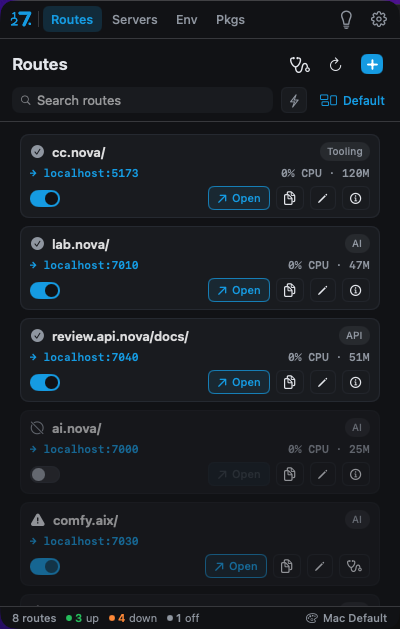
localhost:5173 becomes https://dashboard.test.
Start, stop, restart, and inspect every local service.
A trusted certificate, no browser warnings.
Ports, env, PATH, and packages, visible and manageable.
Which one was the API again?
A pile of listening ports, processes you started days ago and forgot, and a browser that keeps warning you about your own dev server. You answer all of it today with a scatter of lsof, cat /etc/hosts, and tribal knowledge.
localhost:3000localhost:5173localhost:8080Your connection is not privateNames you chose. Servers you control.
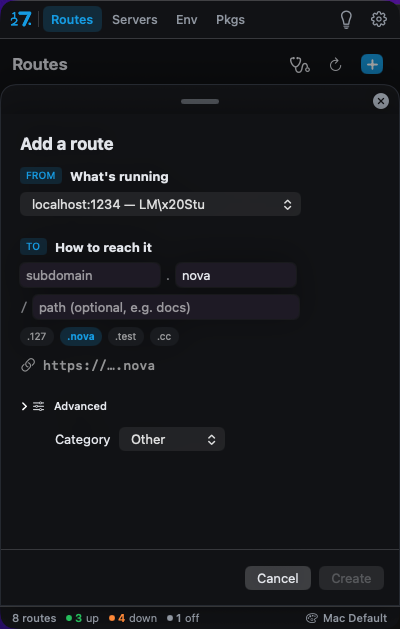
Give each running app a domain you pick, then start, stop, and inspect it from one place. Flip a route on or off with a toggle.
https://dashboard.test→localhost:5173https://api.test→localhost:7040https://lab.test→localhost:7010Give every local app a name you’ll remember.
Pick a running port, give it a name, done. Behind the toggle, 127 manages a local reverse proxy, your hosts file, and a local certificate authority, so the domain resolves and loads cleanly. Every route shows a live health dot, checked along the real request path: does it resolve, is the proxy up, is the cert trusted, is the port listening, is your app answering. The dot tells the truth, not a config file.
- Web0% CPU · 120Mdashboard.test
localhost:5173 - API1% CPU · 51Mapi.test
localhost:7040 - AI0% CPU · 47Mlab.test
localhost:7010 - Web0% CPU · 25Mstudio.test
localhost:7000
Live. Toggle a route and watch its health.
And yes, real HTTPS.
A local certificate authority in your login keychain means https:// loads with no browser warnings, on a domain you named.
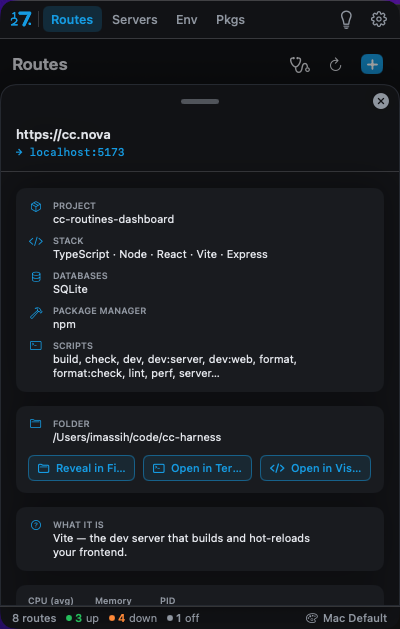
See what’s behind a route.
Open any route to see the app behind it: project name, language and framework, the databases it talks to, scripts, and git remote. With Reveal in Finder, Open in Terminal, and Open in your editor.
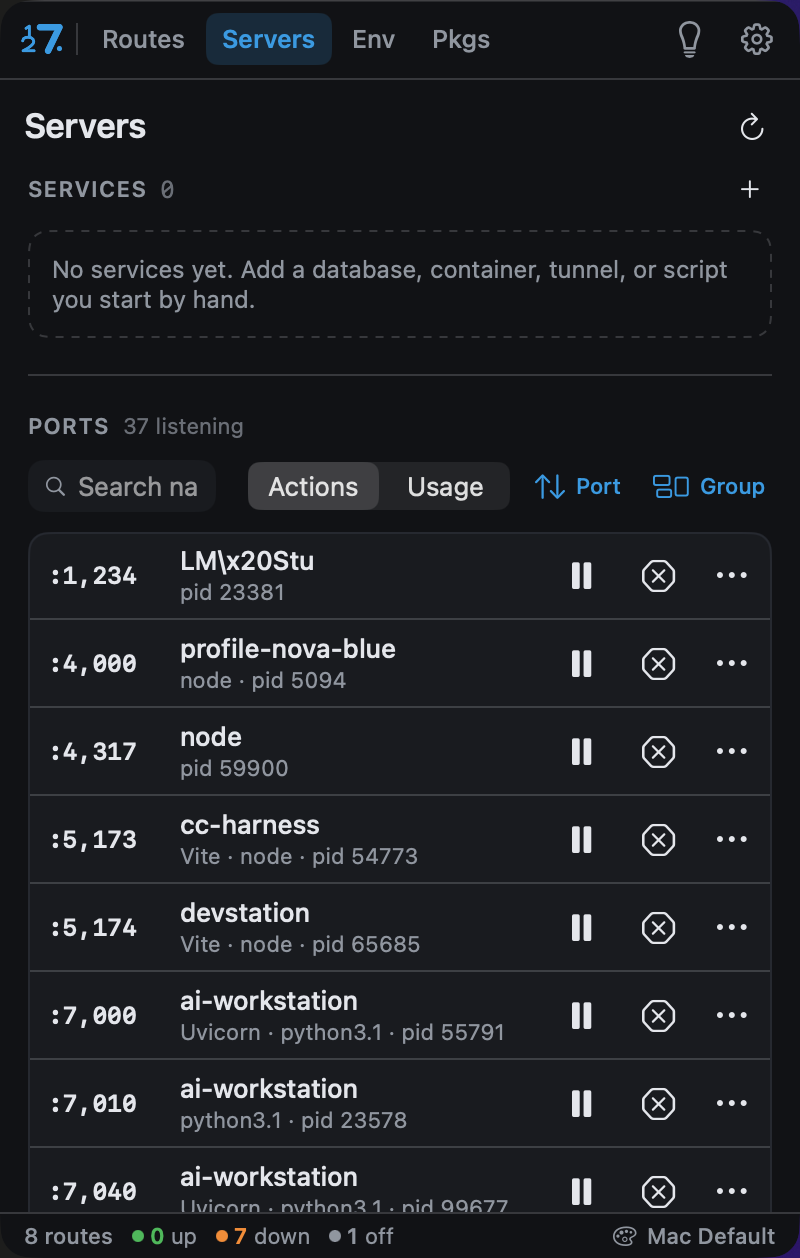
Every service you run, in one place.
See every listening port and the process behind it, with live CPU and RAM. Flip between action mode to start, stop, restart, and inspect, and usage mode for big live meters that surface whatever is eating your machine. Investigate any process to turn a bare nodeinto “the dashboard dev server, running from ~/code/....” Declare the things you always run, a database, a container, a tunnel, a script, as named Services and control their lifecycle from one place.
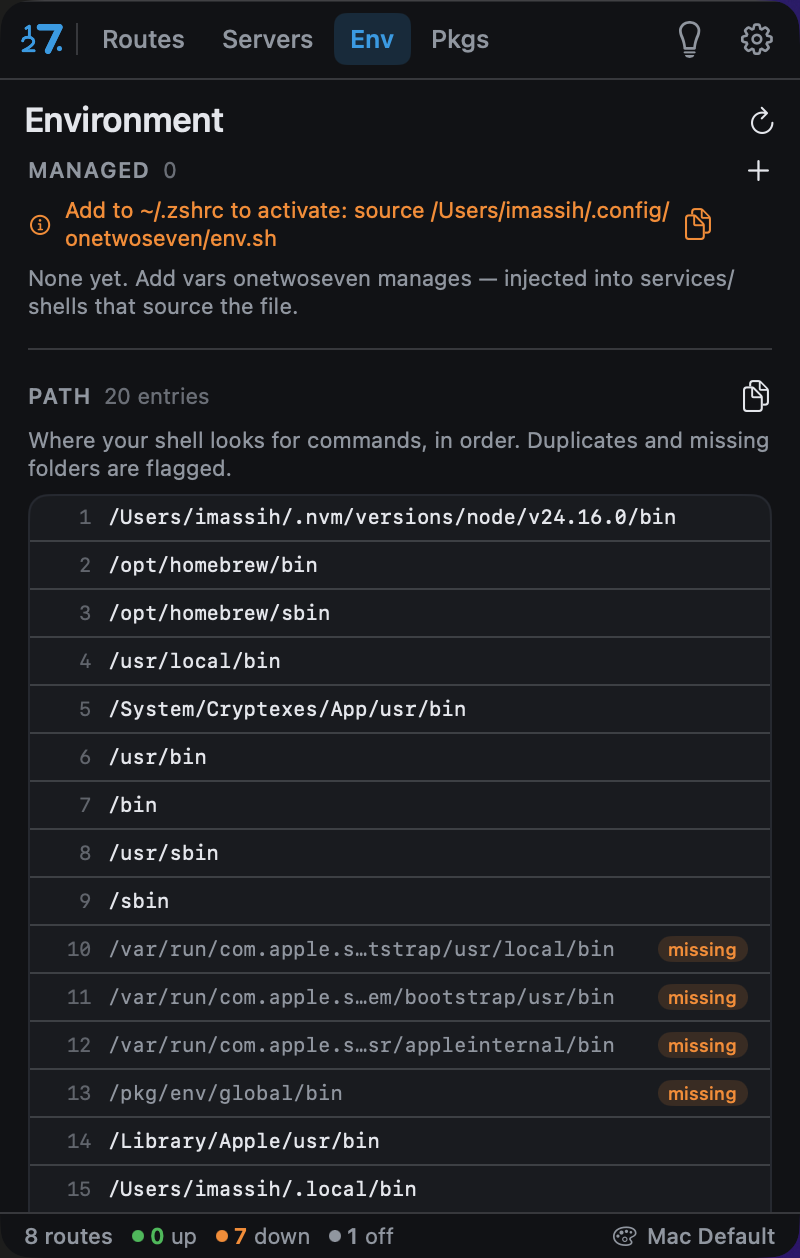
Your shell environment, finally readable. And safe.
See your environment variables, with secret values masked by default and revealed only after Touch ID. A dedicated PATH breakdown numbers every entry in order and flags duplicates and missing folders, the usual cause of “command not found” and the wrong python resolving. Variables that 127 manages for you go into a tidy, owner-only file you opt into from your shell, never sprayed across your dotfiles.
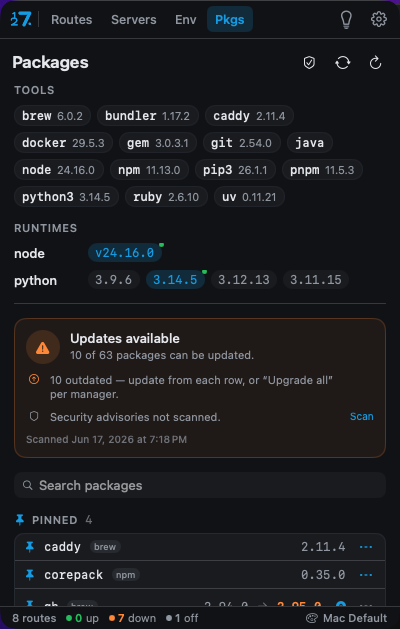
Audit and update everything you installed globally.
One unified view of your global packages across npm, Homebrew, and uv: current version versus latest, with update, uninstall, change-version, and pin on every row. See how far behind you are, then bring a package current without leaving the app. Security is built in. Your globals are checked against the OSV vulnerability database, and Project Audit runs a scanner over any repo’s lockfiles, npm, PyPI, Cargo, and Go at once, and lists known vulnerabilities with the version that fixes them.
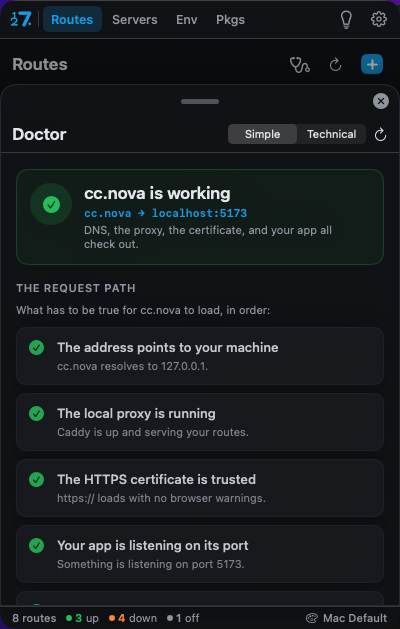
When a route will not load, it tells you why.
Doctor walks the request path as a checklist and shows the exact step that fails: the address resolves, the proxy is running, the cert is trusted, the port is listening, the app is answering. Fix all repairs what the app can handle itself behind one password prompt. Flip from Simple to Technical for the probe details. When it cannot fix something, it gives you the commands to try and a ready-to-paste prompt describing the problem for your AI.
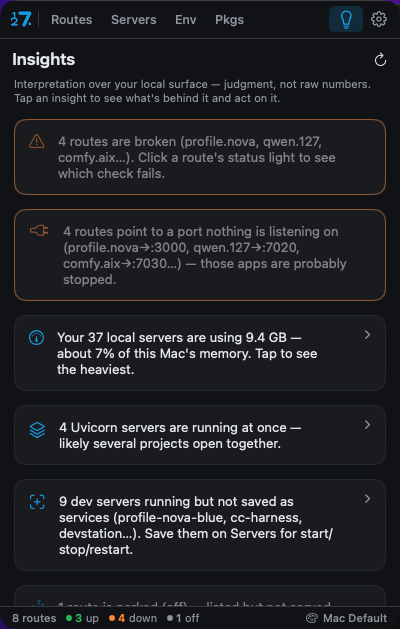
A read on what is running, not a wall of numbers.
127 interprets your local surface and surfaces the things worth knowing: routes pointing at a port nothing is listening on, dev servers running but never saved as services, how much memory your local servers are using. Situational awareness you can act on.
One app, three layouts. Not just three color schemes.
Most apps’ themes are a palette swap. 127’s theme engine restyles structure, the same data and logic in genuinely different layouts. Icons keep the same motif in every theme, and health colors never change, so a broken route can never be dressed up to look fine.
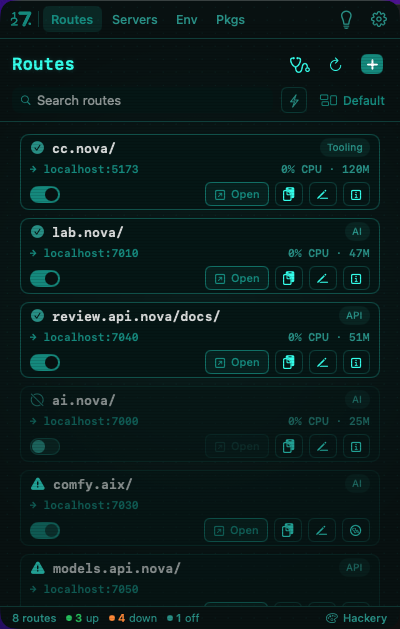
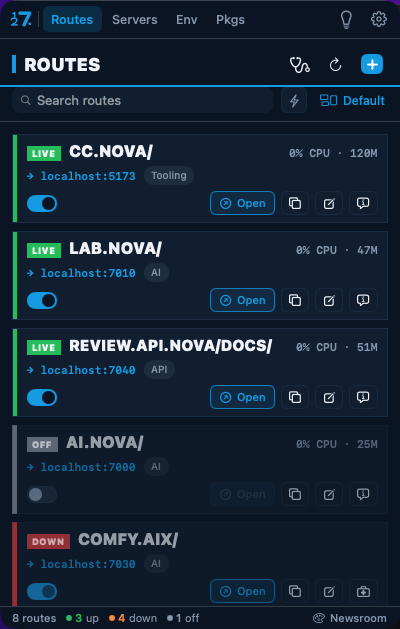
127 collects nothing, sells nothing, and shows you no ads.
No analytics. No tracking. No account to sign into. The app never phones home with your data. The only thing that ever leaves your machine is a list of package names and versions, sent to a public vulnerability database over HTTPS so it can tell you what is unsafe. No paths, no environment, no identifiers.
It asks for trust once, and earns it.
Admin rights once, at first-run, to set up routing and the certificate authority. Daily edits need no password. The certificate authority lives in your login keychain, not the system store, so it only affects your user account and only mints certificates for the local domains you declare. Secrets stay masked until you authenticate.
Three steps from first run.
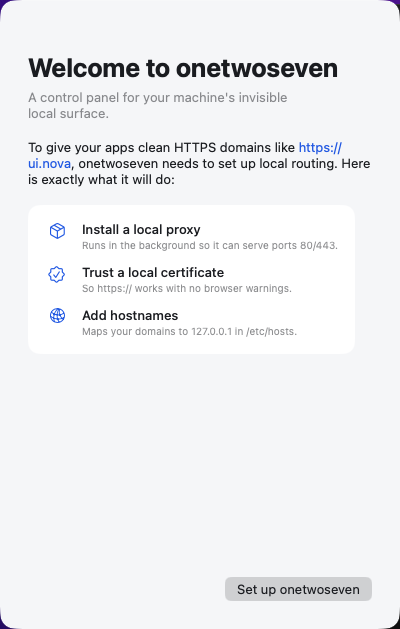
No magic. Here is what 127 sets up on your Mac.
Serves the standard ports so your domains can answer.
Adds a local certificate authority so https works with no warnings.
Maps your domains to 127.0.0.1, so dashboard.test resolves to the app on your own machine.
Buy it once. Keep it.
- ✓ One-time purchase, no subscription
- ✓ 14-day free trial, no account needed
- ✓ Offline licensing
- ✓ Free updates
- ✓ macOS 13+, Apple silicon or Intel
Questions, answered plainly.
Do I need an account?
No. You can try and buy without one. Licensing is validated offline.
Is there a trial?
Yes, a 14-day free trial with full features.
What do I need installed?
macOS 13 or later, and Caddy via Homebrew. 127 sets up the rest.
Is it safe to let it touch my hosts file and install a certificate?
Yes, and it is scoped tightly. The CA goes into your login keychain, which only affects your user account, and it only mints certificates for the local domains you declare. 127 asks for admin rights once, at first-run, and a built-in security self-check lets you review trust any time.
Does it phone home?
No. The only data that leaves your machine is package names and versions, sent to a public vulnerability database so it can flag what is unsafe. No paths, no environment, no identifiers.
Will macOS Gatekeeper complain when I open it?
127 is signed today, with a notarized build on the way. On first launch, right-click the app and choose Open, then confirm once.
One-time purchase or subscription?
One-time. Buy it once, keep it.
Can my team share routes?
Team config sharing, export and import route sets, is on the roadmap.
What happens when a route breaks?
Doctor walks the request path, tells you the step that failed, fixes what it can in one click, and hands you commands or an AI prompt when it cannot.